


Previous
Members & PermissionsNext
Team ManagementManage your workspace subscription, payment methods, and billing information.
The Usage & Billing settings let you view your current plan, monitor usage, manage payment methods, and update billing details. Access these settings to upgrade your plan, download invoices, or update your billing contacts.
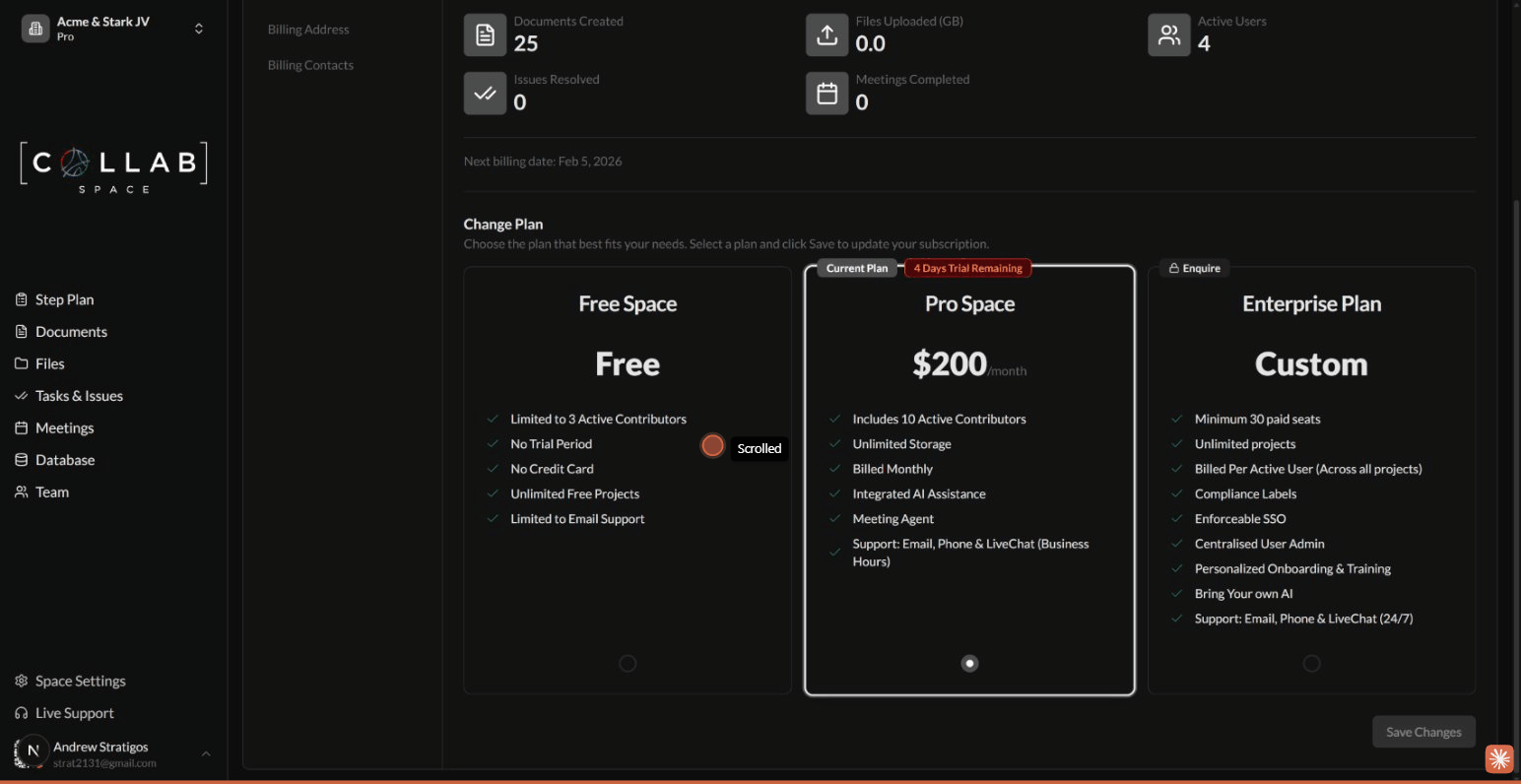
To access billing settings, go to Settings in the sidebar, then select the Usage & Billing tab.
View your subscription status and workspace usage at a glance.
Track your workspace activity for the current billing period:
| Metric | Description |
|---|---|
| Documents Created | Number of documents created this month |
| Files Uploaded | Total storage used (in GB) |
| Active Users | Number of active contributors |
| Issues Resolved | Completed issues this month |
| Meetings Completed | Finished meetings this month |
The Next billing date shows when your subscription will renew.
Choose the plan that best fits your team's needs:
| Plan | Price | Best For |
|---|---|---|
| Free Space | Free | Small teams getting started |
| Pro Space | $200/month | Growing teams needing full features |
| Enterprise | Custom | Large organizations with compliance needs |
To upgrade or downgrade your plan:
Plan changes take effect at the start of your next billing cycle.
Manage the payment methods used for your subscription.
Your saved payment methods appear in the Payment Methods section. Each card displays:
You must have at least one valid payment method on file for paid plans.
Access your billing history and download invoices for your records.
Invoices include:
Invoices are automatically sent to all billing contacts when generated. You can also download them manually from the Invoices section.
Set the company information that appears on your invoices.
| Field | Description |
|---|---|
| Company Name | Your organization's legal name (optional) |
| Address Line 1 | Street address |
| Address Line 2 | Suite, floor, or unit (optional) |
| City | City name |
| Country | Country selection |
| State / Province / Region | State or region |
| ZIP Code | Postal code |
| EIN | Employer Identification Number for US businesses (optional) |
Changes apply to all future invoices.
Manage who receives invoices and billing notifications.
| Action | Description |
|---|---|
| Set as Primary | Designate the main billing contact |
| Edit | Update contact information |
| Delete | Remove a billing contact |
The primary contact receives all billing communications first. Additional contacts receive copies of invoices and important billing notifications.
Subscriptions are billed monthly on your billing date. You can see your next billing date on the Current Plan page.
Contact support for refund requests. Refunds are evaluated on a case-by-case basis.
If a payment fails, we'll notify your billing contacts and retry the charge. After multiple failed attempts, your workspace may be downgraded to the Free plan.
To cancel, change your plan to Free Space. Your workspace will retain access until the end of your current billing period.